Custom event booking and check-in system

A box office system built around the complete event journey

This anonymous case study covers a bespoke event-management platform currently being developed by Atinamos for an arts and events organisation.

The system brings together public event listings, online bookings, hosted payments, automated ticket emails, QR-code entry and practical administration tools within one connected workflow.

The aim is not simply to create a ticket-sales page. It is to support the full journey from publishing an event through to booking management and admitting attendees at the venue.

Bespoke operational system Event booking SumUp integration QR-code ticketing Mobile check-in In development

More than taking a payment

Smaller arts and events organisations may otherwise need separate tools for event listings, ticket selection, payment, booking records, confirmation emails, attendee lists, entry checking and administration.

The challenge was to connect the whole event journey rather than leaving staff to manage listings, payments, attendee information and door entry across several disconnected systems.

The system needed to handle both paid and free bookings, issue individual tickets, maintain clear booking states and give staff practical tools for managing events before and during the performance.

Designing the booking flow as one connected system

The development considered how visitors discover events, how ticket choices are presented, how bookings are reviewed before payment, how free and paid routes differ, how payment confirmation is verified, how tickets are issued, how event staff check attendees in, how administrators manage events and bookings, and how invalid, cancelled or wrong-event tickets are handled.

Each stage was designed to pass reliable information into the next, so that the public booking journey, payment state, ticket record and check-in process remain connected.

The public event experience

The customer-facing side of the system covers the full journey from discovering an event to receiving a confirmed ticket:

Event listings

Public event cards present the information needed to understand what is available and move into the booking journey.

Individual event pages

Each event can have its own page with date, time, venue, image, description, ticket availability and booking status.

Venue information and directions

Venue details can include practical directions and links to mapping services.

Ticket selection and review

Visitors can choose from the ticket types available for the event, subject to capacity and booking status. A review stage gives the customer an opportunity to check the booking before continuing.

Free and paid routes

The system handles both paid bookings and zero-cost or complimentary bookings without forcing every booking through the payment provider.

Confirmation

Confirmed customers receive a clear confirmation page and ticket information.

Hosted SumUp payment integration

For paid bookings, the customer is transferred to a hosted SumUp checkout. Card details are entered with SumUp rather than being collected or stored by the event system.

When the customer returns, the system checks the relevant payment and transaction status before confirming the booking and issuing tickets. Returning to the website alone does not mark a booking as paid. Zero-cost and complimentary bookings do not need SumUp.

Payment status and booking status are kept separate but connected, so that the system can distinguish between a completed payment and a confirmed booking.

Individual tickets delivered automatically

Each confirmed ticket is generated with its own code and QR entry token. The customer receives ticket information by email in both HTML and plain-text formats, giving event staff a consistent record to validate at the venue.

Tickets are tied to a specific booking and event, so that each attendee has a unique, verifiable entry record.

Mobile-friendly entry checking

Event staff can select the relevant event and use a mobile-friendly check-in screen to scan QR tickets or locate attendees manually.

The workflow is designed to flag tickets already used, reject tickets for the wrong event and prevent invalid or cancelled booking records from being treated as valid entry.

Practical tools for event staff

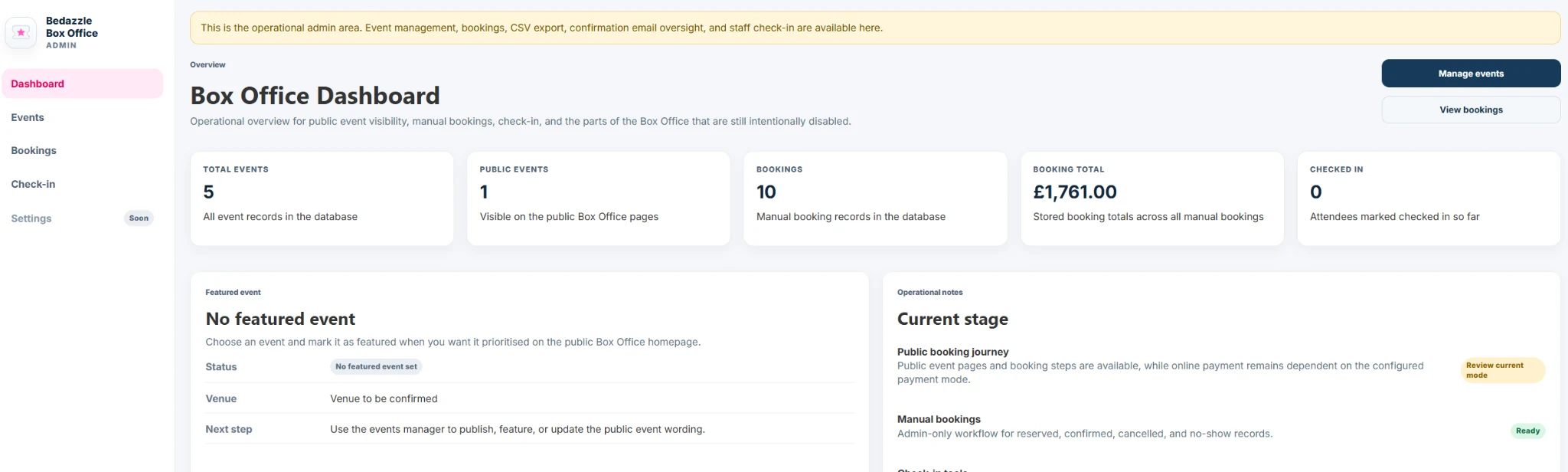
The administration area supports the operational work behind each event:

Event creation and status controls

Administrators can create and update event details, dates, venues, images, ticket information, capacity and booking availability. Events can move through practical states such as draft, coming soon, on sale, sold out, closed, hidden and archived.

Booking management

Staff can search, review and update booking records. Authorised staff can also create and manage complimentary bookings without incorrectly treating paid bookings as free.

Payment and booking states

The system keeps separate but connected records for booking status, payment status and ticket validity.

Exports, archive and audit

Booking information can be exported for practical event administration. Older records can be archived through controlled workflows. Administrative and payment events can be recorded to support oversight and troubleshooting.

Safeguards built into the workflow

The development has included checks around booking value, payment state, ticket validity and event matching so that common workflow errors are handled consistently.

Zero-cost bookings can confirm without payment. Positive-value bookings cannot be treated as complimentary by mistake. Payment confirmation requires verified provider status. Repeated return requests do not create duplicate booking confirmation. Cancelled or invalid tickets cannot be accepted at check-in. Tickets are valid only for the correct event, and already-used tickets are clearly flagged.

More than a booking form

The system combines public event pages, bookings, payment integration, ticket generation, email delivery, QR validation, check-in and administration within one connected platform.

It demonstrates Atinamos's ability to design operational software around both the customer-facing journey and the staff processes behind it.

Still under active development

The core event, booking, payment, ticketing and check-in workflows have been built, but the system remains under active development and testing before wider operational use.

One connected journey from event listing to venue entry

The project has developed into a substantial event-management system covering the public booking journey, hosted SumUp payments, ticket delivery, QR-code validation, mobile check-in and event administration.

Because the system is being designed around the organisation's own workflow, new features and controls can be added without forcing the event process into a generic ticketing template.

What the project demonstrates

  • Operational discovery
  • Event-booking journey design
  • Public website development
  • Booking-state management
  • Hosted SumUp payment integration
  • Free and complimentary booking logic
  • Automated email delivery
  • Individual ticket generation
  • QR-code validation
  • Mobile check-in tools
  • Event and booking administration
  • Capacity and event-status controls
  • Data export
  • Audit and troubleshooting workflows
  • Ongoing system development

Need a booking system that fits how your events actually run?

Tell us what happens from publishing an event through to admitting attendees. We will help you explore whether one focused system could bring the journey together.